
Download Accountabilabuddy – AI Goal‑Tracking, Free Reminders & Productivity Tool
Overview
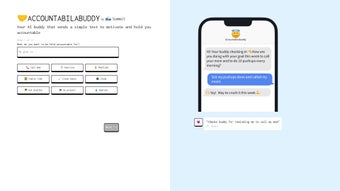
Accountabilabuddy, developed by Summit, is an AI‑driven goal‑tracking tool that places accountability and motivation directly in the palm of your hand. Unlike generic habit‑tracking apps that simply log activities, Accountabilabuddy acts as a virtual companion that proactively reminds you of the commitments you’ve set. The core of the service is an automated text‑messaging engine that sends timely nudges—whether it’s a gentle “time to stretch” or a firm “call Mom now”—to keep you aligned with personal or professional objectives.
The interface is deliberately minimalistic: users choose from a curated list of preset goal categories such as exercising, meditating, studying, and even reaching out to family members. Each selection creates a custom reminder schedule, allowing you to focus on what truly matters without drowning in configuration options.
What makes Accountabilabuddy stand out is its blend of simplicity and intelligent automation.
The AI engine learns from your interaction patterns, adjusting reminder frequency and tone to avoid fatigue while maintaining effectiveness. Whether you are a student trying to stay on top of coursework, a remote worker seeking structure, or anyone aiming to build healthier habits, the tool provides a supportive, non‑intrusive push that encourages consistency. Security is also a priority; all text communications are encrypted, and personal data is stored on compliant cloud servers, giving you peace of mind while you pursue your goals.
In short, Accountabilabuddy transforms the abstract concept of “self‑discipline” into a concrete, daily practice backed by technology.
Key Features that Power Your Success
- Automated SMS Reminders: Real‑time text messages tailored to your chosen goals, sent at optimal times based on your daily rhythm.
- AI‑Optimized Scheduling: The system learns when you’re most responsive and adjusts reminder intervals to maximize impact without causing annoyance.
- Preset Goal Library: Ready‑made categories like Exercise, Meditation, Study Sessions, Family Calls, and Custom Tasks to get you started instantly.
- Simple Dashboard: A clean, intuitive interface that shows upcoming reminders, completed actions, and streak statistics at a glance.
- Cross‑Platform Sync: Access your goal list from any device—web, Android, or iOS—and keep your data consistent everywhere.
- Secure Data Handling: End‑to‑end encryption for all messages and GDPR‑compliant storage of personal information.
- Progress Analytics: Visual charts that illustrate habit formation trends, helping you identify patterns and celebrate milestones.
- Free Tier with Optional Premium Upgrade: Core reminder functionality is free; premium adds advanced AI customization, multiple goal tracks, and priority support.
Each of these features is designed to reduce friction and boost motivation. The automated SMS channel is particularly effective because text messages have a 98 % open rate, far higher than email or push notifications. By combining AI‑driven timing with a library of proven habit categories, Accountabilabuddy eliminates the guesswork that often stalls new routines. Users also appreciate the visual progress analytics, which turn abstract data into tangible encouragement—seeing a 30‑day streak can be a powerful catalyst for continued effort. Moreover, the free tier ensures that anyone can start building accountability without financial barriers, while the premium plan offers deeper personalization for power users who demand granular control over their habit ecosystem.
Installation, Usage Instructions & Compatibility
Getting Started in Three Simple Steps
Installing Accountabilabuddy is designed to be as straightforward as the app’s daily reminders. First, visit the official Summit website or your device’s app store (Google Play for Android, Apple App Store for iOS) and click “Download.” The installer size is under 30 MB, ensuring a quick download even on slower connections. Once the app launches, you’ll be prompted to create a free account using an email address or social login.
After verification, the onboarding wizard walks you through selecting your first goal category. Choose a preset option—say “Morning Exercise”—and set the preferred reminder time (e.g., 7:00 AM). The AI will automatically schedule the first SMS, and you’ll receive a confirmation message shortly thereafter.
Daily Workflow
Each day, Accountabilabuddy sends a concise text reminding you of the upcoming task. You can reply with “Done” to log completion, or “Snooze 10” to delay the reminder by ten minutes. The app’s dashboard updates in real time, showing a green checkmark for completed actions and a red flag for missed ones. Over time, the AI refines the timing based on your responses—if you consistently snooze a 7:00 AM reminder, it may suggest a later slot that fits your routine better. The analytics page provides weekly and monthly summaries, allowing you to spot trends such as “most active days” or “goal fatigue.”
Compatibility Across Devices
Accountabilabuddy is built to work seamlessly on the major operating systems. On desktop, a responsive web portal runs on any modern browser (Chrome, Firefox, Edge, Safari) and offers the same dashboard functionality as the mobile apps. For smartphones and tablets, native apps are available for Android 12+ and iOS 13+. The service also supports integration with popular calendar apps (Google Calendar, Outlook) via a secure API, allowing reminders to appear alongside your existing schedule. Because the core reminder channel is SMS, users on feature‑phone devices can still benefit from the service without needing a smartphone, provided they have a working mobile number.
Pros and Cons – A Balanced Review
Pros
- Highly effective SMS reminders with near‑perfect open rates.
- AI adapts to personal habits, reducing reminder fatigue.
- Free tier offers core functionality without hidden costs.
- Simple, clutter‑free UI makes goal setup minutes, not hours.
- Secure, encrypted communication protects user privacy.
- Cross‑platform sync ensures data consistency on any device.
- Progress analytics turn data into motivation.
Cons
- Premium features (multiple goal tracks, advanced AI) require a subscription.
- Limited customization for reminder messages beyond preset templates.
- No built‑in voice‑assistant integration (e.g., Alexa, Google Assistant).
- Relies on cellular service; users without reliable SMS may experience delays.
- Desktop web portal lacks some of the real‑time push capabilities of mobile apps.
Overall, Accountabilabuddy delivers on its promise of turning accountability into an everyday habit. The pros heavily outweigh the cons for most users, especially those who value a straightforward reminder system over feature‑rich but complex habit trackers. The free tier is generous enough to test the concept, while the premium upgrade provides a logical path for power users seeking deeper AI customization.
Frequently Asked Questions
Is Accountabilabuddy really free to use?
Yes. The core functionality—including unlimited SMS reminders for one goal track—is completely free. A premium subscription unlocks multiple concurrent goal tracks, advanced AI scheduling, and priority customer support.
Do I need a smartphone to receive reminders?
No. Accountabilabuddy uses standard SMS, so any mobile phone capable of receiving text messages can receive reminders, even if it’s a basic feature phone.
How does the AI determine the best reminder time?
The AI analyzes your response patterns—such as when you mark a reminder as “Done” versus when you snooze or ignore it—and gradually shifts future reminders to the moments you’re most likely to act.
Is my personal data safe?
Accountabilabuddy stores all user data on GDPR‑compliant cloud servers and encrypts every SMS payload. The company’s privacy policy explicitly states that no personal data is sold to third parties.
Can I integrate Accountabilabuddy with my calendar?
Yes. Using the built‑in integration settings, you can sync reminders to Google Calendar, Outlook, or Apple Calendar, ensuring you see goal notifications alongside meetings and appointments.
Conclusion – Take Control of Your Goals Today
If you’ve struggled with sticking to personal or professional objectives, Accountabilabuddy offers a no‑friction, AI‑enhanced solution that turns accountability into a daily habit. Its free tier lowers the barrier to entry, while the premium upgrade provides sophisticated features for users who want deeper customization. By delivering secure, high‑open‑rate SMS reminders and visual progress tracking, the tool helps you convert intentions into results without overwhelming you with complexity. Ready to experience a more disciplined, motivated version of yourself? Download Accountabilabuddy now and let a virtual companion keep you on track—one text at a time.






